
So far the iPad has been a great hit in our home. From remote access, browsing the web, email and movies. I have only good things to say about this device.
Inside the comfort of my own home I know my connection is safe. However, when I venture out to public wifi or a coffee shop, I cannot be a comfortable with the network security. When using my laptop at a public wifi I normally use SSH or a VPN to secure my connection. I will show you a quick how-to on using VPN on you iPad to get a secure connection when using a public hotspot.
To use a VPN client on your iPad you will need a VPN server somewhere. I use DDWRT as a vpn server at my home. It has a built-in PPTP VPN server. The iPad supports (PPTP, IPSec, and L2TP).
Thankfully the iPad has a built in VPN client. To access the settings for this you will need to go into settings | general | network.
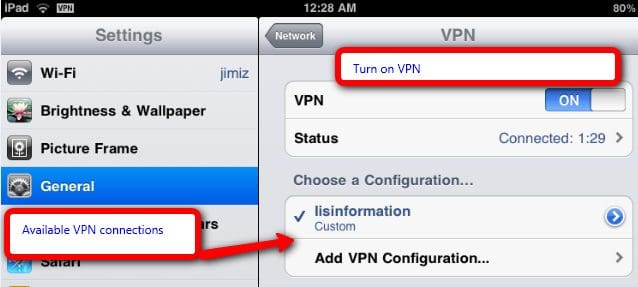
Under your network settings you can find vpn connections. In this section you can turn on vpn, view the status of a connection, add a connection or edit a connection. We will be adding a connection:
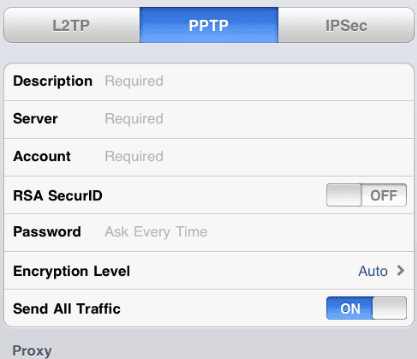
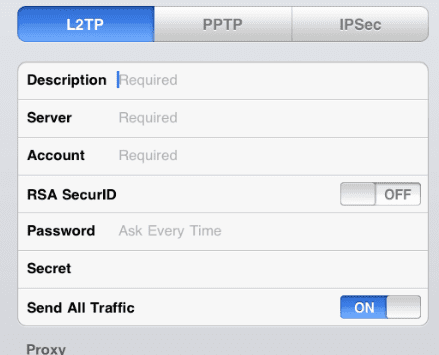
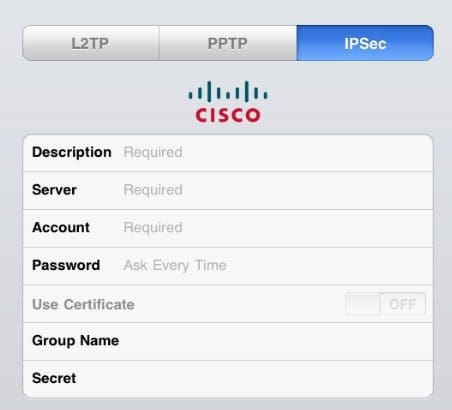
Next you select “Add Vpn Connection”. Select PPTP, L2TP, or IPSec. For each type of vpn you have different options:
PPTP:
L2TP:
IPsec (cisco):
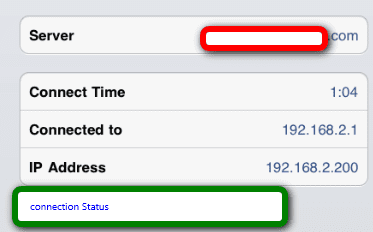
Once you have setup your vpn connection you only need to go back to the setting page (network / vpn) to enable the vpn connection. You then can view the status and be connected or browsing through your VPN tunnel. In the image below I can connected to my home VPN and have an IP of 192.168.2.200.
Happy secure browsing. Remember to still take precautions when in a public location and using any type of secure sites.
If you are in need of a personal VPN provider, I recommend wifi-vpn.com.
Interesting article Jim.
I have a similar setup…new iPad and a VPN runinng on DDWRT. I can connect with my VPN with Win 7, but not the iPad.
Would you be willing to share info on the options you set on the server?
Thanks,
KC
I had DDWRT v24sp2
Here are the settings. Pretty standard / default.
Here is a screen shot
http://screencast.com/t/N2NjZGQwMz
Here is the command configuration:
root@myrouter:~# nvram show|grep “pptpd”
pptpd_client_srvsub=0.0.0.0
pptpd_forcemppe=1
pptpd_bcrelay=1
pptpd_client_srvip=
pptpd_client_ipparam=
pptpd_client_srvsec=mppe required
pptpd_radserver=0.0.0.0
pptpd_radpass=
pptpd_enable=1
pptpd_client_mtu=1450
pptpd_client_srvsubmsk=0.0.0.0
pptpd_radius=0
pptpd_client_srvmru=1450
pptpd_rip=192.168.2.200-220
pptpd_radport=1812
pptpd_client_srvpass=
pptpd_client_srvmtu=1450
pptpd_client_enable=0
pptpd_client_srvuser=DOMAIN\\Username
pptpd_acctport=1813
pptpd_client_nat=1
size: 32757 bytes (11 left)
pptpd_auth=Myusername* Mypassword*
root@jimizrouter:~#
Thanks Jim.
Still didn’t work so I decided to delete the VPN Configuration and re-enter it…that’s when I realized I’d been leaving a character out of the password all day. *slaps forehead*
On the upside, once they get the bugs worked out of this app http://www.stratospherix.com/products/filebrowser/support/ it’ll be awesome to be able to access my network resources from the road.
I would like to do this with the VPN connection integral to WIN 7. Can’t get it to work yet. Should this be OK?
My Ipad will connect to my home DD WRT but as soon as I try and open safari or a app is will disconnect. I have an iphone that can connect with no problems any suggestions?
CAn you see the IP address of the iPad on your ddwrt router? If so is it taking over an exiting IP?
Thanks for the comments everyone.
Thanks for the article, problem I have is when I am on the VPN I cannot access the public Internet, I know how to configure my CISCO VPN client on my PC but do not see similar option on Ipad, any clues
On your VPN or network do you have a defined proxy setting (or gateway) It is possible that the ipad cannot find it’s way to the internet.
What version of the vpn client are you using? It may be something that has to be set.
Hello
I have seen lots of discussion about PPTP and L2TP with shared key VPN’s for iPad but our solution is L2TP/IPSEC. The requriements are a device certificate and windows authentication.
Has anyone tackled this? I think the tricky part is that on a pc, the certificate must be in the computer store and not the user store.
Any thoughts are apreciated!
@Scott I have not yet find a solution but i have dtermined the problem was the ddwrt dhcp server. Once I set a static ip, ther is no more disconnects.
i only buy my pc parts on very reputable computer stores both online and offline”‘-
ipad is support is MS-CHAP-V2 (Microsoft Challenge-Handshake Authentication Protocol v2) and all vpn are use PAP(password authentication protocol)
I found a site called hidepad.com, they charge $8.99/month, but claim to provide ‘push-button’ easy VPN setup for the iPad, if anyone’s interested.
Thank you for the link on hidepad.com. I sent them a message to see what their app does. I’d like to try it. I am guessing it is basically a VPN account.
Thank you for the info and screenshots. Between your site and this one http://bit.ly/gCAspD I was able to Finally get my vpn working on my ipad.
Hello , you seem to be the only person on this planet who knows how to use this VPN thing ! urgh ! its so confusing ! so what i do is
– go to settings
-General
-network
– VPN
add vpn ,
now where do i find all the information for this ?
like the decripiton ? the server ? the account ?
where do i find the information to set this up ?
http://www.freevpn.co – Free PPTP VPN for windows, mac and iphone/android mobile, very nice service, always free, works very well in my iPad and windows 7 PC 🙂
I have used this method to configure my VPN on both my iPhone 4 and iPad 2 with success, sort of.
The connection works flawlessly with the exception that my iPad consistently cannot connect if it is the first client connecting to the VPN. As soon as I make a connection from my iPhone or a PC to the VPN, then my iPad will connect successfully every time. I can then disconnect the first client and the iPad will continue to function on the VPN as expected. Reconnecting however, would again require that another client be connected first.
The iPhone and iPad connections are configured identically, both using Encryption Level: Auto.
This is very consistent and reproducable. I can attempt dozens of times to connect to the VPN as the first client from my iPad and it will consistently show “Connecting”, then “Starting”, then “Disconnecting”. As soon as I make the same connection from my iPhone or PC, the next attempt from my iPad works perfectly.
I am using DD-WRT v24-sp1 and have configured the PPTP server as per this article including required encryption:
http://www.dd-wrt.com/wiki/index.php/PPTP_Server_Configuration
cat /tmp/pptpd/options.pptpd shows the following:
lock
name *
proxyarp
ipcp-accept-local
ipcp-accept-remote
lcp-echo-failure 10
lcp-echo-interval 5
deflate 0
auth
-chap
-mschap
+mschap-v2
mppe required,stateless
mppc
ms-ignore-domain
chap-secrets /tmp/pptpd/chap-secrets
ip-up-script /tmp/pptpd/ip-up
ip-down-script /tmp/pptpd/ip-down
ms-dns 192.168.1.1
mtu 1450
mru 1450
Any ideas would be appreciated.
David
I’ve not seen that type of behavior before. I would first connect via the iPad and see if you can then ssh into the router and look at the logs
/tmp/var/log/messages. I typically do “cat /tmp/var/log/messages” to see what is happening on the device. I would watch the log as you log in and see any messages or errors.
@David
David, See: http://www.dd-wrt.com/wiki/index.php/PPTP_Server_Configuration#iOS.2FiPhone
Hey jimiz,
i’ve been searching the internet for practically a day, and your guide is the only one that actually makes ipad’s connect to DD-WRT,
could you help me figure it out,please? (i’m kinda desperate abit)
settings: DD-WRT on tp-link w1043nd (its the latest version) 24v sp2,
ipad2 with 3g,
been trying to set the usual, all options enabled, skipping dns1,2 and wins1,2 serverip- my router LAN IP, client ip, some free ip range-20(20 addresses) and chap is user * password * (i hope i got it right)
and it won’t work.. 🙁 what am i missing? i tried a few commands but i don’t see how it catches or anything…
thanks for your help mate, really appreciate it..
I have some news about it. i made a few try outs, and it seems that with dyndns it doesn’t connect. not sure why yet, but i’ll look into there 🙂 if anyone can help me out with this or solved that issue, i’d love to hear.
Well, i’m just doing a follow up for anyone with that problem.
Dyndns not updating.
i done it on custom,
done in the dyndns server: members.dyndns.org (please notice it is said .com on the dd-wrt tutorials)
and added the url like on dd-wrt, /nic/update?
(not to mention user, password,and the host address which is the usual part.)
Thank you for the update
I will update the post today. I appreciate the info on the incorrect info about .com
I removed the VPN app and And still the VPN in the settings so I want help how to remove it from
The setting please I need help
I’m also having this problems
I just subscribed to “Hotspot Shield” VPN for my MacbookPro and iPad. It is very convenient and easy to install. You just need to complete the initial VPN setup by installing .dmg file on your Mac. Once you done with the setup you can access the blocked content which ever you want. Check it here –
http://www.hotspotshield.com/free-proxy
Hi! Used to have not problem connecting to VPN, just slide to “On” and it would connect. Then the connection got way too slow. So we changed the server at our VPN Strong..now the ipad is asking for the password each time we slide “ON”. How can I get it to keep the password? THANKS!
Download vpn setup
What is a use of VPN