For the past six months, I’ve been running my own local AI stack [powered by ollama, n8n, and Supabase], and it’s been an absolute game-changer for my development workflow and automation projects.
It’s all made possible thanks to the fantastic local-ai-packaged project (Thanks, Cole), which bundles everything you need to run AI models in a container-friendly way. This setup has saved me money, reduced dependency on cloud APIs, and made experimenting with AI much faster.
My Setup
I split my local AI environment into two main components:
-
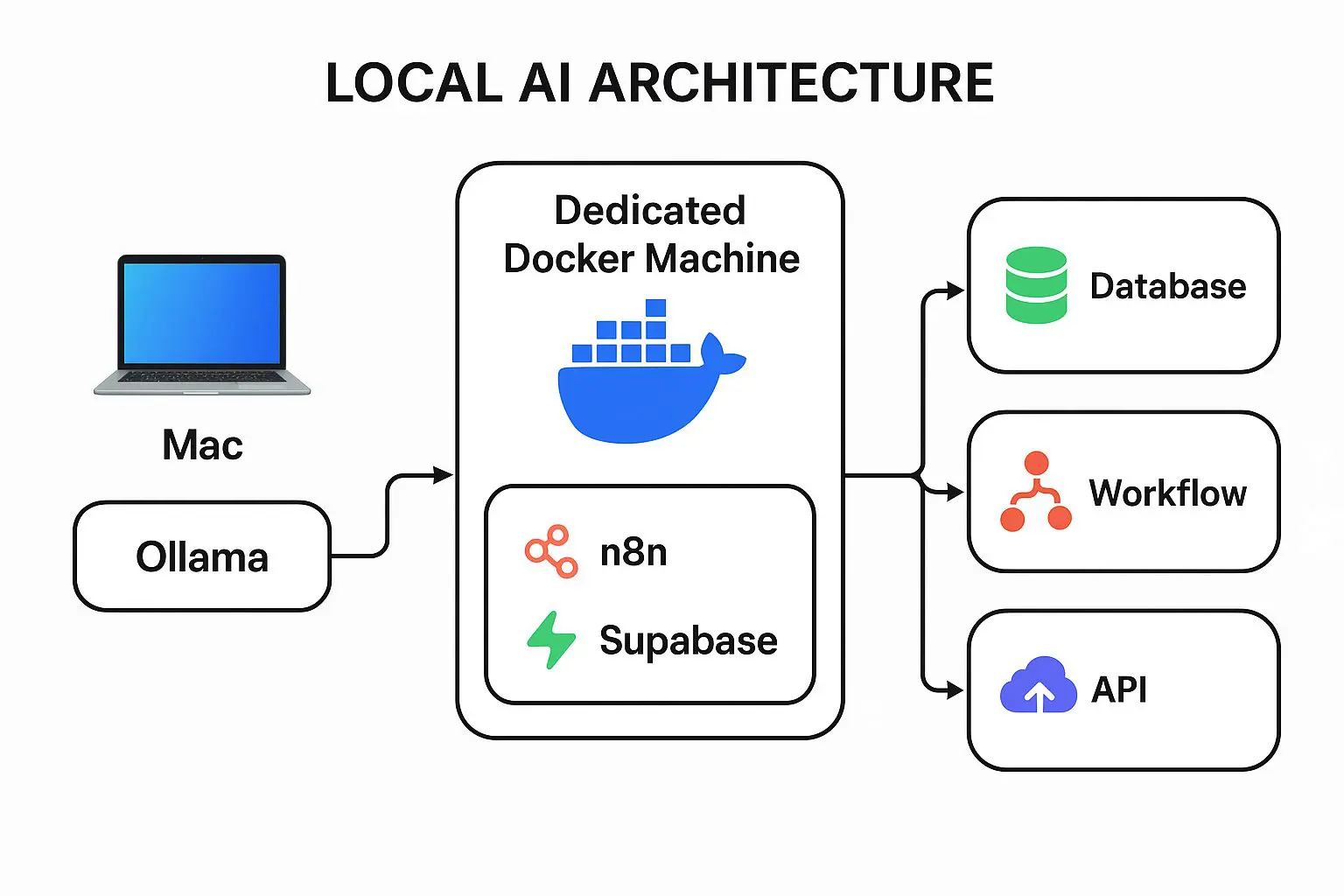
MacBook Pro M1: Runs my Ollama instance, leveraging the M1’s powerful GPU for inference. (Side note: I’ve been eyeing the new Apple M3 Ultra… after reading this comparison between M3 Ultra and NVIDIA RTX, I’m convinced it would be a giant leap.)
-
Dedicated Docker Machine: Runs n8n, Supabase, and the rest of my automation stack. This separation keeps my AI workloads snappy while letting the Docker box handle databases, triggers, and integrations.
Why Local AI?
Running AI locally gives me:
-
Faster iteration: No round-trips to cloud APIs, so testing prompts or chaining models together is near-instant.
-
Lower costs: I’ve removed a few recurring API charges. I still use cloud AI for certain tasks, but my baseline automation now runs on local compute.
-
Privacy & control: My data never leaves my network unless I choose to send it.
For development, it’s just fun. Especially when I’m prototyping new workflows in n8n. I can integrate Ollama as a local endpoint, push results into Supabase, and trigger downstream automations without worrying about API limits or cloud latency. Who else has their Doorbell activate alexa and then send me a text (with an image)
n8n + Ollama + Supabase in Action
Here’s a common workflow I run:
-
Trigger: n8n watches an email inbox or incoming webhook.
-
Process with Ollama: The text or document is sent to a local Ollama model for summarization, classification, or Q&A.
-
Store in Supabase: Results are saved for analytics or future retrieval.
-
Automate further: n8n sends alerts, updates dashboards, or pushes results into another app.
It’s basically my own private AI assistant, fully offline until I decide otherwise.
Lessons Learned After 6 Months
-
GPU matters: The M1 handles my needs well, but bigger models make me dream about the M3 Ultra.
-
Separate concerns: Running the model server separate from orchestration tools keeps everything responsive.
-
Stay hybrid: Local AI handles 80% of my needs, but cloud AI is still useful for massive LLMs or specialized APIs.
The Future of My Setup
I’m already considering scaling up to an M3 Ultra Mac for even faster local inference. Between the speed, cost savings, and privacy benefits, I can’t imagine going back to a purely cloud-based setup.
If you’re a developer or automation enthusiast, I highly recommend trying to run AI locally. You might be surprised how far your own hardware can take you.
This knowledge has been instrumental as our business continues to leverage AI and deliver services.